Not sure which Scandit product fits your use case?
Install the Scandit plugin and use the /data-capture-sdk skill so that your AI coding agent can recommend the right product for your use case. More info →
Run the following command in your project directory. It detects the supported coding agents you have installed and adds the Scandit plugin to each. Re-run it to update.
npx plugins add scandit/skillsPrefer to set it up yourself? Manual installation steps for each agent →
Find Items
Powered by MatrixScan Find, a feature available in the Scandit Smart Data Capture SDK, this mode enables you to speed up finding and picking workflows by scanning multiple items at once and highlighting the correct items in real-time using an AR overlay.
Create the Find List
Using the Find mode in Scandit Express requires providing a list of barcodes to be found to the end-user. There are multiple ways to create this list, detailed below.
Online Find List Generator
We recommend that you start with creating a list with the barcodes to find (Find List) using our Find List generator. Here is how it works:
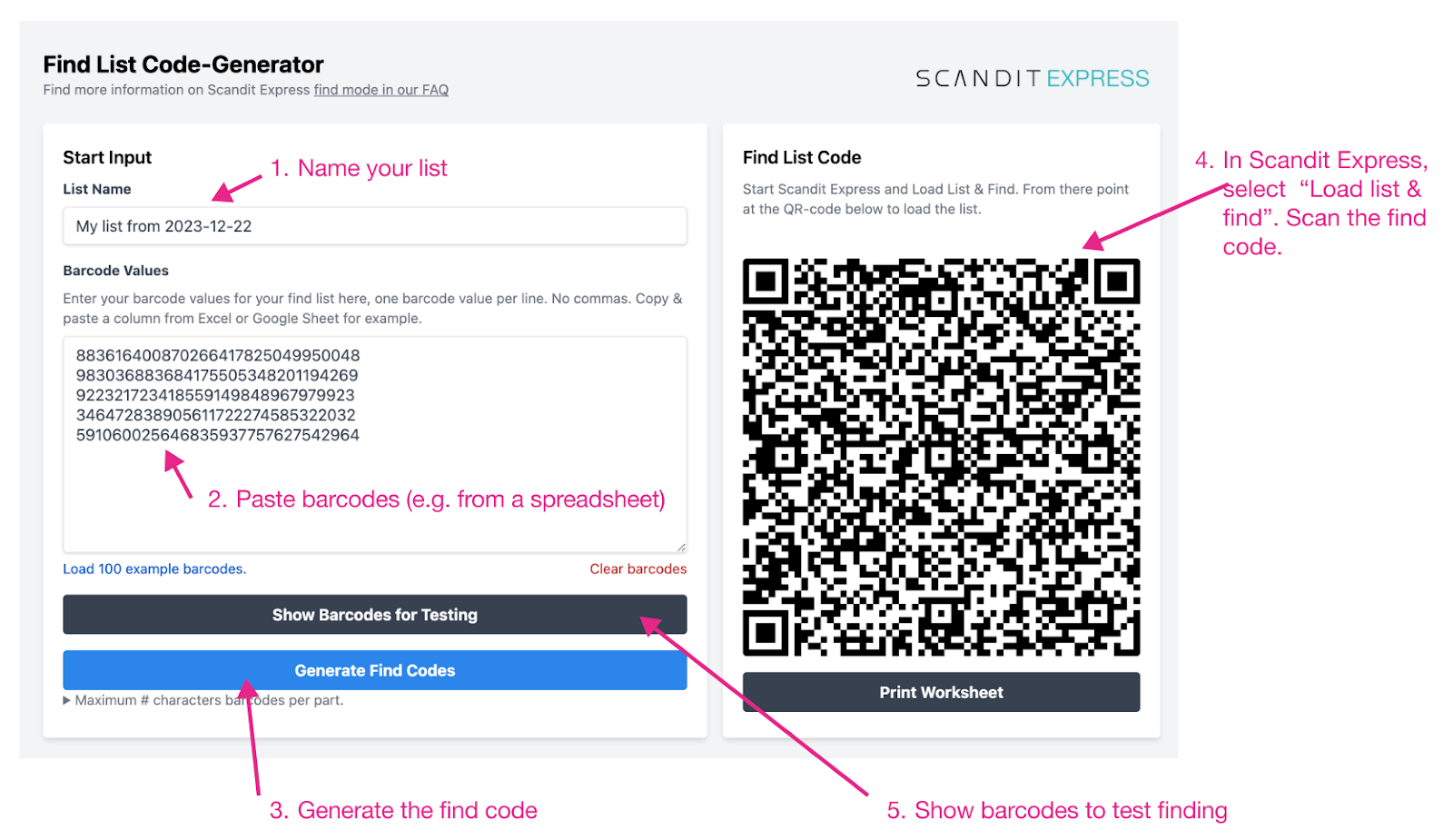
Spreadsheet Find List
You can also provide the Find List to your end-users as a spreadsheet.
On Device
A Find List can also be created on the device by scanning the barcodes to be found, for example by using a reference sheet.
Select Create List & Find in the Scandit Express app and scan the barcodes to be found. The app will then create a Find List based on the scanned barcodes.
Share the Find List
Once the Find List is created, it can be shared with the end-users by either sharing a link (via text, Slack, email, etc.) or by integrating into your app.
Share a Link
You can also generate a URL in the format shown below and send it to the end-user. When the link is opened on the device, Scandit Express starts, the list of barcodes is shown and the user can start finding the barcodes with one click.
The link to your Find List must be in the following format:
https://express.scandit.com/find/list?listName=<Your_List_Name_Here>&data=<List_of_Barcodes_Here>
Note the two query parameters that must be set in the URL:
| Parameter | Description |
|---|---|
listName | The name of the Find List. |
data | The list of barcodes to find, separated by commas. |
Remember to use URL encoding for the list name and the list of barcodes:
- For Excel, ENCODEURL can be used.
- For Google Sheets, ENCODEURL can be used.
- For JavaScript, encodeURI() can be used.
- For Python, urllib.parse.urlencode can be used.
Integrate into Your App
You can also integrate the links for your Find Lists (with the barcodes to find embedded in them) in your own application. Follow the instructions above to create your list, and then display the link in your app or your website. If a user clicks on the link it will start Scandit Express and show the list of codes that need to be found.
To integrate specific barcodes to find, you need to:
-
Generate a JSON string.
We encode your barcode values into a JSON object as shown below. The JSON object is directly encoded as a string into a QR-code to create the “Find Code”.
{

"type":"findList",

"listName": "Pick list 230523",

"part": 1,

"partsTotal": 1,

"data": ["050755164998737161267150050464","267904872997493075660232174005","003599442103692589922600168806","794304938682592584917910934794","067998913805565298544505960433","429412684815666169331665683721","629486918747410911816814820923","918501883962214718784809774935","771678071143373996836361503435","535726211992040548851819865224"]

}
The space in QR codes is limited, so if you have more codes that can fit into a single QR code you can create multiple codes. A good rule of thumb is to limit to 2000 barcode characters for a single QR code. Adjust the “partsTotal” field (
"partsTotal": 2) and number each code using the"part"field accordingly ("part": 1and"part": 2). -
Generate a QR code from the JSON string and display it to the user.
Take the JSON created and generate a QR code from it. As an example you can check the implementation in our spreadsheet template (look at the hidden fields in column D-K). You can then display the QR in your app or website.
From Scandit Express, the user can scan the QR with Load List & Find and start finding the barcodes.