Not sure which Scandit product fits your use case?
Install the Scandit plugin and use the /data-capture-sdk skill so that your AI coding agent can recommend the right product for your use case. More info →
Run the following command in your project directory. It detects the supported coding agents you have installed and adds the Scandit plugin to each. Re-run it to update.
npx plugins add scandit/skillsPrefer to set it up yourself? Manual installation steps for each agent →
Scandit Express
Scandit Express is an application that enables you to instantly add barcode scanning to any existing app or software tool on a smart device. It requires no software changes or coding effort, and is compatible with any app or system, even those that cannot be modified. By adding a keyboard that has a scan button above the standard keys (a keyboard wedge), it allows users to scan barcodes directly into any input field.
Scandit Express is built for enterprise use and supports distribution through mobile device management (MDM) and enterprise mobility management (EMM) systems.
Minimum Requirements
| Platform | Minimum Version | Camera |
|---|---|---|
| Android | 9.0 | 720p, Autofocus and fixed-focus |
| iOS | 12.0 | 720p, Autofocus and fixed-focus |
UI/UX
The Scandit Express user interface (UI) is designed to resemble a smartphone camera. It also includes features to reduce user workload and frustration, such as aiming assist, batch scanning, and visual, sound, and haptic feedback. There is also an advanced Find mode that helps frontline workers and customers instantly locate items using an augmented-reality (AR) interface.
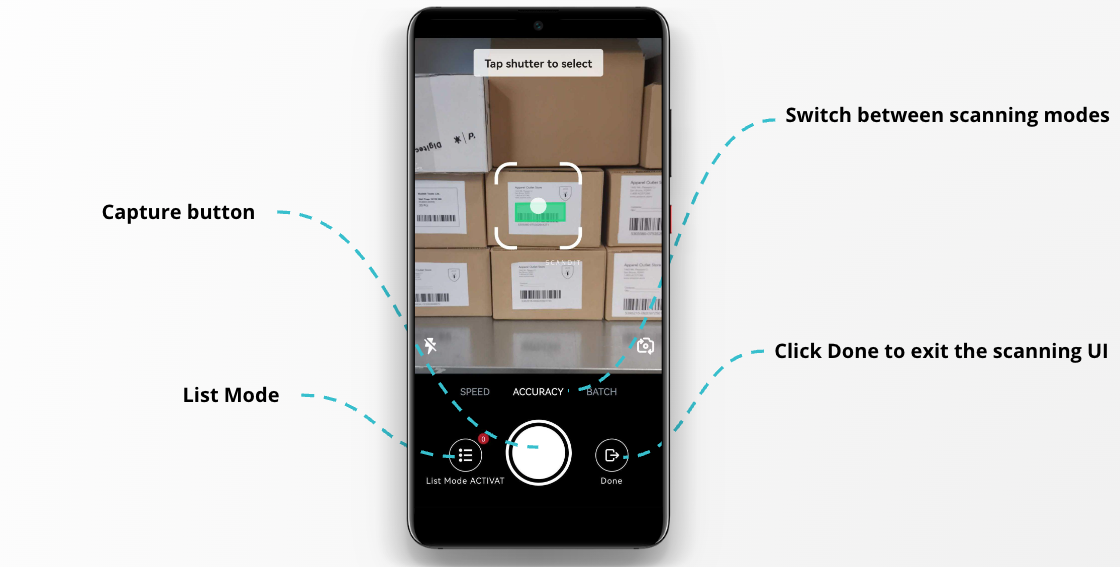
You can scan barcodes one at a time or all at once, and collect your scans in a list to check them before they go into the field.
Scanning Modes
Scandit Express offers two scanning modes:
- Single: Point the camera at a barcode to scan it. If several barcodes are close together, choose the one you want. Single mode, also called Smart Scan Selection, is available from Scandit Express 4.3.0 on iOS and 4.4.0 on Android. It replaces the earlier Accuracy and Speed modes.
- Batch: Scan all visible barcodes at once. To use Batch mode, you need a MatrixScan license and list building turned on.
With list building, your scans go into a list. You check the list, and then Scandit Express types the barcodes into the field. List building works in both modes. It doesn't need a MatrixScan license, but Batch mode does.
Security and Compliance
Scandit Express follows the same security and compliance standards as all other Scandit products.
Your data belongs to you, and we will never collect it unless authorized by you. No keystrokes are recorded, no images captured for barcode decoding are stored on the device after the scan is complete, and no images are transmitted. Scandit Express is fully functional without network access.
- Devices register with Scandit’s servers to track the total number of devices on which Scandit Express is used.
- No personally identifiable information stored on the device (such as name, phone number, email address, or device ID) is ever processed or transmitted by Scandit Express.
- All communication is encrypted.
- No connectivity into your network and no access to your IT system is required.