Advanced Configurations
MatrixScan Count is optimized by default for efficiency, accuracy, and a seamless user experience. However, there are multiple advanced settings available to further customize MatrixScan Count to best fit your needs.
Scanning Against A List
There is a function to set a list of expected barcodes if you are scanning against a manifest or item list. If this is used, a progress bar is added to the UI, so you can keep track of the process while scanning.
When scanning against a list, the UI will also show red icons to mark scanned barcodes that aren’t present on the list.
List<TargetBarcode> targetBarcodes = new List<TargetBarcode>();
targetBarcodes.Add(TargetBarcode.Create("data", 1));
BarcodeCountCaptureList captureList = BarcodeCountCaptureList.Create(this, targetBarcodes);
barcodeCount.SetBarcodeCountCaptureList(captureList);
Barcode Count Status
This feature is used to provide users with more details regarding the items they’re scanning in order to aid effective handling. The icons (available as part of the SDK) appear as an AR overlay after tapping the “Status Mode” button and can be used to highlight the following:
- Expired products
- Items requiring quality inspection
- Items that are low in stock
- Wrong items
- Fragile items
Clustering
Clustering is a feature that enables grouping multiple barcodes together, either based upon their visual context or manually by the user.
By default, clustering is disabled. It is configured via setting ClusteringMode to one of the following available options:
DISABLED: No clustering is performed.MANUAL: Manual clustering is supported. The user can select which barcodes to cluster using the on-screen UI.AUTO: Clustering is automatically performed and cannot be manually tuned.AUTO_WITH_MANUAL_CORRECTION: Clustering is performed automatically, but clusters can also be formed or dissolved manually using the UI.
Strap Mode
It can be difficult to reach the shutter button if the smart device is attached to the user’s wrist by a strap or similar. In this instance, you can enable a floating shutter button that can be positioned by the end user in a more ergonomically suitable position.
barcodeCountView.ShouldShowFloatingShutterButton = true;
Filtering
If you have several types of barcodes on your label/package, you may want to scan only one of them.
In this case, you can filter the others out. This can be done by symbology, symbol count, or setting a regex.
For example, you might want to scan only Code 128 barcodes and no PDF417 ones.
BarcodeCountSettings settings = new BarcodeCountSettings();
barcodeCountSettings.EnableSymbologies(enabledSymbologies);

settings.FilterSettings.ExcludedSymbologies = new[] { Symbology.Pdf417 };
Or, you want to exclude all the barcodes starting with 4 numbers:
BarcodeCountSettings settings = new BarcodeCountSettings();

settings.FilterSettings.ExcludedCodesRegex = "^1234.*";
By default the filters applied to the relevant barcodes are transparent, but you can use BarcodeFilterHighlightSettings to change the color and level of transparency.
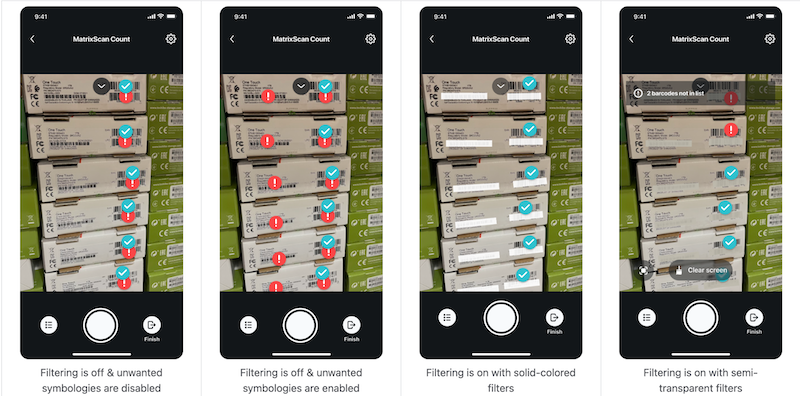
Clear Screen Button
There are situations in which the user may find it helpful to clean up their screen (i.e. clear all the AR overlays) but keep the list of barcodes scanned.
If this is the case, you can enable the “Clear screen” button.
barcodeCountView.ShouldShowClearHighlightsButton = true;
Customize Overlay Colors
MatrixScan Count comes with recommended and user-tested AR overlays. However, if you wish to customize the overlay colors, once the overlay has been added, you can conform to the IBarcodeCountViewListener interface. The methods IBarcodeCountViewListener.BrushForRecognizedBarcode() and IBarcodeCountViewListener.BrushForUnrecognizedBarcode() are invoked every time a new recognized or unrecognized barcode appears. These can be used to set a brush that will be used to highlight that specific barcode in the overlay. Keep in mind that these methods are relevant only when using the style BarcodeCountViewStyle.Dot.
public Brush BrushForRecognizedBarcode(BarcodeCountView view, TrackedBarcode trackedBarcode)
{
// Return a custom brush
}

public Brush BrushForUnrecognizedBarcode(BarcodeCountView view, TrackedBarcode trackedBarcode)
{
// Return a custom brush
}
Notifications
If you want to be notified when a user taps on an overlay, you need to implement the IBarcodeCountViewListener.OnRecognizedBarcodeTapped() and IBarcodeCountViewListener.OnUnrecognizedBarcodeTapped() methods.
public void OnRecognizedBarcodeTapped(BarcodeCountView view, TrackedBarcode trackedBarcode)
{
// Do something with the tapped barcode
}

public void OnUnrecognizedBarcodeTapped(BarcodeCountView view, TrackedBarcode trackedBarcode)
{
// Do something with the tapped barcode
}
Disable UI Elements
The UI is an integral part of MatrixScan Count and we do not recommend that you use it without it. However, if you wish to disable UI elements you can do it as follows.
Disable buttons:
barcodeCountView.ShouldShowListButton = false;
barcodeCountView.ShouldShowExitButton = false;
barcodeCountView.ShouldShowShutterButton = false;
Disable feedback and hints:
barcodeCountView.ShouldShowUserGuidanceView = false;
barcodeCountView.ShouldShowHints = false;