Not sure which Scandit product fits your use case?
Install the Scandit plugin and use the /data-capture-sdk skill so that your AI coding agent can recommend the right product for your use case. More info →
Run the following command in your project directory. It detects the supported coding agents you have installed and adds the Scandit plugin to each. Re-run it to update.
npx plugins add scandit/skillsPrefer to set it up yourself? Manual installation steps for each agent →
About MatrixScan Find
MatrixScan Find is our pre-built UI that uses augmented reality overlays to highlight items that match predefined criteria. It enables you to add a search-and-find experience with augmented reality to an existing Kotlin Multiplatform app with just a few lines of code.
MatrixScan Find bundles multiple scanning features together and addresses many common challenges associated with scanning on smart devices. It is designed to be easily integrated into any application, and can be customized to fit your specific needs.
On Kotlin Multiplatform, MatrixScan Find is exposed through the BarcodeFind data capture mode and the BarcodeFindView built-in UI, both of which are shared between Android and iOS.
UI Overview
MatrixScan Find includes pre-built and pre-tested user interface (UI) elements and interactions. These UI elements are intentionally minimalistic, meant to be overlaid on any application without the need to adapt the existing app while offering the best user experience.
The UI workflow is designed to be as simple and ergonomic as possible, and includes the following elements:
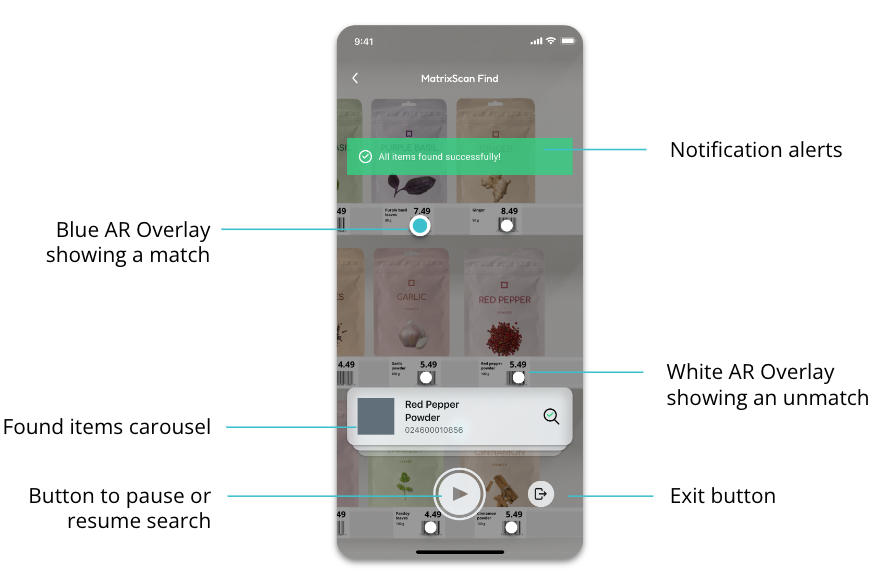
- A shutter button the user operates in order to initiate scanning and searching for items.
- Feedback is overlaid as colorful visual dots highlighting items on screen.
- When paused, MatrixScan Find shows a carousel listing all the items currently being searched for, with a check mark for those already found.
Upon completing the search, if all items have been found, you can advance the user to the next step automatically—for example finalizing an order, or moving on to the next search.
Supported Symbologies
MatrixScan Find supports all symbologies except DotCode, MaxiCode and postal codes (KIX, RM4SCC).
Next Steps
Continue with Get Started to add MatrixScan Find to your application, or jump straight to Advanced Configurations if you already have a basic integration running.