Barcode AR Popover Annotation
Defined in package com.scandit.datacapture.barcode.ar.ui
- BarcodeArPopoverAnnotationAnchor
Added in version 7.2.0
The available anchor options for a popover annotation.
- LEFT
Added in version 7.2.0
The annotation is anchored at its left edge.
- RIGHT
Added in version 7.2.0
The annotation is anchored at its right edge.
- BOTTOM
Added in version 7.2.0
The annotation is anchored at its bottom-center point.
- TOP
Added in version 7.2.0
The annotation is anchored at its top-center point.
- BarcodeArPopoverAnnotationListener
interface BarcodeArPopoverAnnotationListenerAdded in version 7.1.0
The listener for the popover annotation.
- onPopoverButtonTapped(popover, button, buttonIndex)
fun onPopoverButtonTapped(popover: BarcodeArPopoverAnnotation,
        button: BarcodeArPopoverAnnotationButton,
        buttonIndex: Int)
Added in version 7.1.0
Called when a button is tapped. The buttonIndex parameter can be used to identify which button was tapped. Called only if BarcodeArPopoverAnnotation.isEntirePopoverTappable is false.
- onPopoverTapped(popover)
fun onPopoverTapped(popover: BarcodeArPopoverAnnotation)
Added in version 7.1.0
Called when the popover is tapped. Called only if BarcodeArPopoverAnnotation.isEntirePopoverTappable is true.
- BarcodeArPopoverAnnotation
class BarcodeArPopoverAnnotation : BarcodeArAnnotation
Added in version 7.1.0
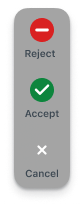
An annotation comprising a set of buttons, each containing an icon and text, which appears only when the user taps on the corresponding barcode highlight.
- BarcodeArPopoverAnnotation()
BarcodeArPopoverAnnotation(context: Context,
        barcode: Barcode,
        buttons: List<BarcodeArPopoverAnnotationButton>)
Added in version 7.1.0
Constructs a new instance with the given buttons and barcode.
- update(barcodeLocation, highlightViewLocation, view)
fun update(barcodeLocation: Quadrilateral,
        highlightViewLocation: Quadrilateral?,
        view: View)
Added in version 7.3.0
Called to update the view with barcode location and highlight location. Called from the main thread. This method should not be called directly, it will be invoked automatically when needed.
- createView()
fun createView(): View
Added in version 7.3.0
Called once to get the view that will be updated with barcode location in update(). Called from the main thread.
- isEntirePopoverTappable
var isEntirePopoverTappable:
BooleanAdded in version 7.1.0
If false each individual button in the popover is tappable. If true the entire popover is tappable. Default is false.
- anchor
var anchor: BarcodeArPopoverAnnotationAnchor
Added in version 7.2.0
The annotation anchor. The default value is BarcodeArPopoverAnnotationAnchor.BOTTOM.
- listener
var listener: BarcodeArPopoverAnnotationListener?
Added in version 7.1.0
An object that receives notifications for UI-related events, such as tapping on a button.
- annotationTrigger
var annotationTrigger: BarcodeArAnnotationTrigger
Added in version 7.1.0
The trigger that causes the annotation to be presented. By default is BarcodeArAnnotationTrigger.HIGHLIGHT_TAP.
- buttons
val buttons: List<BarcodeArPopoverAnnotationButton>
Added in version 7.1.0
Returns the buttons provided in the constructor.
- BarcodeArPopoverAnnotationButton
class BarcodeArPopoverAnnotationButtonAdded in version 7.1.0
- BarcodeArPopoverAnnotationButton()
BarcodeArPopoverAnnotationButton(icon: ScanditIcon,
        text: String)
Added in version 7.1.0
Constructs a new instance with the given icon and text.
- textColor
var textColor:
IntAdded in version 7.1.0
The color of the text. Default is #3D4852.
- textSize
var textSize:
FloatAdded in version 7.1.0
The size of the text. Default is 10 scale-independent pixels.
- typeface
var typeface: Typeface
Added in version 7.1.0
The typeface of the text. Default is Typeface.DEFAULT.
- icon
val icon: ScanditIcon
Added in version 7.1.0
The icon provided in the constructor.
- enabled
var enabled:
BooleanAdded in version 7.1.0
Whether the button is enabled. Default is true.